Texture Mapping
1. Textures
A texture can be a 2D function (a
- Texture Coordinates
which are the coordinates of the texture. - Surface Coordinates
which are the coordinates of the surface.
2. Texture Mapping
Textures are often unwrapped from 3D to 2D, and then mapped back to 3D. This is done by defining a mapping from surface coordinates to texture coordinates. The mapping can be done in several ways:
- Planar Mapping: The texture is projected onto the surface along a plane. This is the simplest mapping, but it can cause severe distortion if the surface is not flat.
- Cylindrical Mapping: The texture is projected onto the surface along a cylinder. This is suitable for surfaces that are roughly cylindrical, but can still cause distortion.
- Cube/Box Mapping.
- Spherical Mapping.
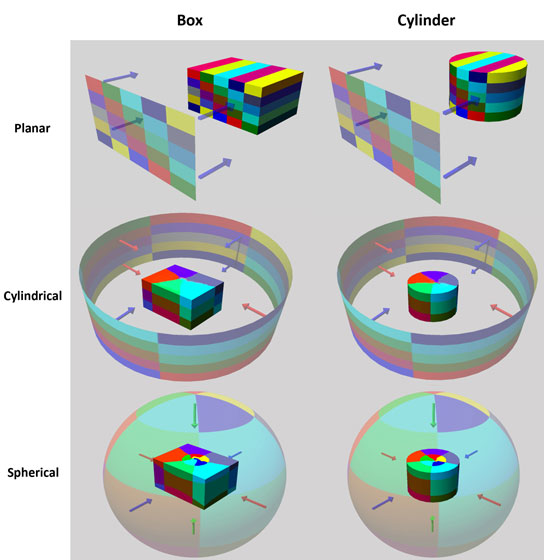
To generate this, we can do this manually (unwrapping) or procedurally.
Since we texture map after projection to 2D, we get perspective distortion (o.e. equal distances in world space do not map to equal distances in screen space). To avoid this, we can do perspective correct texture mapping by interpolating the texture coordinates in screen space and then dividing by the depth.
3.1 Tiling
When images are too small to cover the entire surface, we can tile them:
- Static Color - The texture is extended with a fixed color.
- Clamped - The texture is extended with the edge color.
- Repeat - The texture is repeated.
- Mirrored Repeat - The texture is repeated and mirrored to hide repetitions (seams).
Texture Synthesis algorithms can be used to generate larger textures from smaller samples, by analyzing the patterns in the sample and creating new textures that maintain the same visual characteristics.
3.2 Perspective Correct Interpolation
We must specify a texture coordinate for each vertex, then linearly interpolate these values in screen space. We could use something similar to Gourard shading, by computing the texture coordinates at each vertex and then interpolating them across the surface. However, this can lead to perspective distortion (equal distances in 3D space do not map to equal distances in screen space). To fix, use perspective correct projection:
- Assign paramtere
to 3D vertices , . controls linear blend of texcoords of and s.t. at and at . - Assume for simplicity, wlog
. - Compute
and . . - Hence,
. - To summarize,
.
3.3 Bilinear Interpolation
You could also texture a quad using bilinear interpolation:
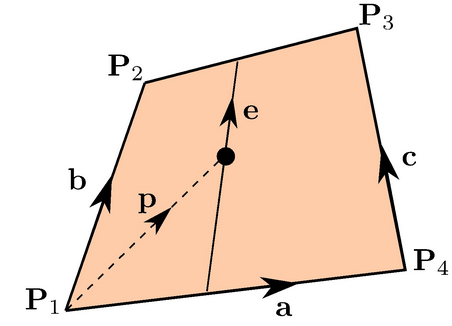
If
3. Uses for Texture Mapping
Texture mapping increases apparent complexity of simple geometry, and can be used as diffuse, normal, specular or even bump & displacement maps.
A bump map is a black and white image. Partial derivatives of the bump map are used to perturb the normal vector, which is then used in lighting calculations to create the illusion of surface detail without increasing geometric complexity.
A displacement map actually modifies the geometry of the surface based on the texture, creating real geometric detail. This can be more computationally expensive than bump mapping, but it can produce more realistic results.
4. Environment Maps
We can simulate reflections byu using the direction of the ray to index a spherical texture map at "infinity". This is called environment mapping.